
7 Website Speed Optimization Tips for a Faster Site
Estimated reading time: 8–10 minutes
When a visitor lands on your website, every millisecond matters. A slow website frustrates users, damages your brand's credibility, and directly hurts your conversion rates. In the digital marketplace, speed is no longer just a technical metric; it is a foundational pillar of user experience and modern search engine optimization.
Optimizing your website performance is not a one-time task that you can finish and forget.
Web standards evolve. Plugins update. Content grows. Maintaining a fast site requires an ongoing process of monitoring and refinement.
At a Glance
- Direct Impact: Website speed directly affects your Google rankings, user experience, and conversion rates.
- No Redesign Needed: Most slow websites can be significantly improved without undergoing a complete, costly redesign.
- Core Priorities: Focus your efforts on Core Web Vitals, image optimization, browser caching, and quality web hosting.
- Proactive Testing: Test your website regularly to fix technical bottlenecks before they impact your daily visitors.
- Measurable Growth: Small, incremental performance improvements often lead to highly measurable business results.
What Are Website Speed Optimization Tips?
Website speed optimization tips are practical, strategic actions designed to reduce page load time and improve overall site responsiveness. To truly speed up a website, you must address both front-end assets, like images and scripts, and back-end infrastructure, like server configurations.
At Le Studio, we approach performance systematically.
We always begin every optimization project with a complete, hands-on performance audit rather than immediately installing automated optimization plugins. This precise diagnostic phase ensures we solve the root causes of slowness instead of simply masking the symptoms.
- Image Compression: Reducing the file size of images without sacrificing visual quality.
- Hosting Upgrades: Choosing a server infrastructure tailored to your traffic volume.
- Caching Configuration: Storing static files closer to the user to reduce server processing time.
- Code Minification: Cleaning up spacing and unused characters in code files.
- Script Management: Limiting the impact of third-party tracking codes and tools.
- Database Maintenance: Cleaning up overhead and old revisions in your content management system.
- Mobile Tuning: Structuring your site layout to ensure instant rendering on mobile networks.
The Short Answer
Website speed optimization is the strategic process of auditing, refining, and maintaining a website's technical architecture to ensure it loads as quickly as possible for users. By focusing on image compression, reliable hosting, efficient caching, clean code, minimal third-party scripts, optimized Core Web Vitals, and routine performance monitoring, businesses can systematically eliminate the bottlenecks that slow down their digital presence.
Why Website Speed Matters More Than Ever in 2026
The expectations of internet users are higher than they have ever been. Slow loading times are no longer tolerated, and users will quickly abandon a site in favor of a faster competitor.
During our technical client website audits, we consistently find that unoptimized assets and outdated server setups silently drive away potential customers before they even see the business's core message.
Faster Websites Create Better User Experiences
When your pages load instantly, navigation feels seamless and natural. Users are much more likely to explore multiple pages, read your content, and engage with your brand when they do not have to wait for elements to load.
Website Speed Influences SEO Rankings
Google explicitly uses page speed and user experience metrics as ranking factors. If your site takes too long to become interactive, search engine crawlers notice the high bounce rates and may lower your visibility in search results.
Slow Pages Can Reduce Leads and Sales
Every extra second added to your page load time increases the likelihood that a user will abandon their shopping cart or contact form. Fast websites build immediate trust, helping you capture leads and secure sales efficiently.
Is Your Website Losing Customers? A slow website can hurt your rankings and conversions. We'll identify what's slowing it down.
No obligation • Expert recommendations
Measure Your Website Before You Start Optimizing
You cannot effectively improve what you have not accurately measured. Before making any changes to your code or hosting environment, it is critical to run a comprehensive website speed test to establish a baseline.
Which Performance Metrics Actually Matter?
While a simple loading time score is helpful, true page speed optimization requires looking at specific milestones during the loading process. You need to know when the first piece of content appears, when the main content becomes visible, and when the page becomes fully interactive for the user.
Understanding Core Web Vitals
Core Web Vitals are a specific set of metrics that Google uses to evaluate the real-world user experience of a webpage. They measure loading performance, visual stability, and how quickly a page responds to user inputs like clicks or taps.
As defined by Google's own web.dev documentation, Core Web Vitals set the industry standard for measuring real-world user experience. Google PageSpeed Insights remains the most widely used free tool for checking whether your site meets these benchmarks.
Recommended Speed Testing Tools
We utilize several industry-standard tools to diagnose performance issues and verify optimization results.
| Tool | Best For | Free/Paid | Key Metrics |
|---|---|---|---|
| Google PageSpeed Insights | Assessing Core Web Vitals and Google-specific SEO compliance | Free | LCP, INP, CLS, Performance Scores |
| GTmetrix | Analyzing detailed waterfall charts and page loading timelines | Free & Paid options | Fully Loaded Time, Total Page Size, Request Counts |
| WebPageTest | Advanced testing from specific geographic locations and device types | Free & Paid options | First Byte Time, Start Render, Visual Progress |
Not Sure What Your Speed Score Means? We'll analyze your website and explain exactly what needs improvement.
Actionable insights • Free consultation
The 7 Website Speed Optimization Tips
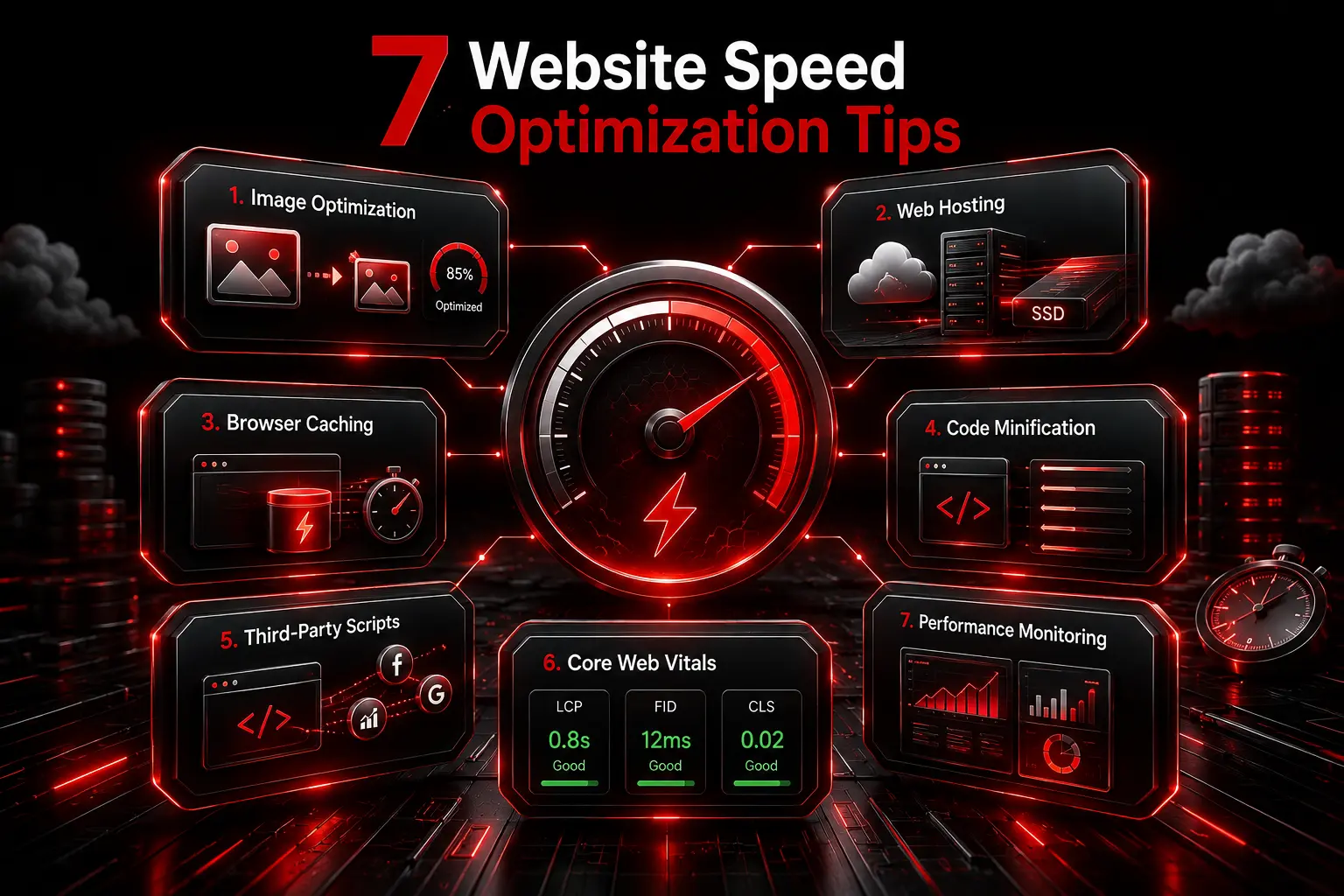
Implementing these seven proven website speed optimization tips will help you systematically reduce page load time, improve your Core Web Vitals, and deliver an exceptional experience to your visitors.
Tip #1 — Optimize and Compress Images
Large, unoptimized images are the single most common cause of slow website performance across the web.
Choose Modern Image Formats
Avoid using heavy formats like PNG or JPEG for standard website graphics. Instead, convert your imagery into modern web formats like WebP or AVIF, which offer superior compression and clarity at a fraction of the file size.
Resize Images Before Uploading
Never upload a photo directly from a camera or smartphone to your website. Crop and resize the image to the exact maximum dimensions required by your website layout before it enters your media library.
Enable Lazy Loading
Lazy loading ensures that images below the fold are only downloaded when a user scrolls down to them. This dramatically reduces the initial page weight and speeds up the visible portion of the site.
Optimizing images is one of the most effective ways to improve page performance, as images are often the heaviest and most prevalent resource on the web, according to Google's own performance documentation.
Tip #2 — Improve Your Web Hosting
Your hosting environment is the foundation of your entire website. No amount of front-end optimization can save a site stuck on a slow, unresponsive server.
Shared vs Managed vs Cloud Hosting
Shared hosting places your site on a server with thousands of others, meaning their traffic spikes can slow your business down. Managed hosting or cloud hosting environments offer dedicated resources and are tailored specifically for platforms like WordPress to ensure consistent speed.
Why Server Performance Matters
A high-performance server processes requests rapidly and delivers data to your visitor's browser without delay. If your business is based in North America, choosing Reliable Web Hosting in Canada ensures lower latency and faster response times for your local audience.
Is Your Hosting Slowing You Down? Upgrade to faster, managed WordPress hosting with free migration.
Free migration • Managed hosting
Tip #3 — Enable Browser Caching
Caching stores copies of your website files directly on the visitor's device, so they do not need to download the same assets on subsequent visits.
Static Asset Caching
Images, CSS stylesheets, and JavaScript files rarely change from day to day. By enabling static asset caching, returning visitors will experience nearly instantaneous load times across your site.
Cache Expiration Best Practices
Configure your server with clear cache expiration rules. Set longer expiration timelines for static assets like logos, and shorter timelines for dynamic content to ensure users always see your latest updates
Tip #4 — Minify CSS, JavaScript, and HTML
Clean, compact code transfers across the internet much faster than bulky, unformatted code files.
Remove Unused Code
Websites often load styles and scripts that are only used on a single page across the entire site. Identifying and removing this unused code prevents browsers from wasting time downloading unnecessary data.
Combine and Compress Files Carefully
Minification removes spaces, line breaks, and comments from your source code files to minimize their size. Combine your core stylesheets and scripts together carefully to reduce the total number of individual server requests.
Unlike automated minification plugins that can sometimes break site functionality, our team manually tests every minified file across staging environments before pushing changes live. This hands-on verification step prevents the broken layouts or missing scripts that generic "optimize everything" plugins can accidentally cause.
Tip #5 — Reduce Third-Party Scripts
Every tracking pixel, chat widget, and analytics script you add to your website introduces external dependencies that can slow your pages down.
Identify Performance Bottlenecks
Use your speed test waterfall charts to see exactly which external scripts are taking the longest to resolve. If a widget takes half a second to load, evaluate if its business value outweighs its performance cost.
Remove Unnecessary Tracking Scripts
Old advertising pixels and unused analytics tools often get left behind in header files. Clean out these legacy scripts routinely to free up browser processing power for your actual website content.
When we audit a client's script library, we do not simply delete tags. We map every tracking pixel and widget back to its business function first, so nothing gets removed without the client's informed sign-off.
Tip #6 — Improve Core Web Vitals
Google's official Core Web Vitals thresholds specify that a good LCP score falls under 2.5 seconds, INP should stay below 200 milliseconds, and CLS should remain under 0.1.
Optimizing for Google's user experience metrics requires addressing specific visual and interactive behaviors on your site.
Largest Contentful Paint (LCP)
LCP measures how long it takes for the largest visual element on the page, usually a hero image or main headline, to render. Optimize your server response times and prioritize critical CSS to improve this score.
Interaction to Next Paint (INP)
INP evaluates how quickly a page responds when a user interacts with it, such as clicking a menu link. Keep your main JavaScript execution light to ensure the browser can react instantly to user inputs.
Cumulative Layout Shift (CLS)
CLS measures visual stability by tracking whether elements jump around while the page is loading. Always define explicit width and height dimensions for images and ad placements to prevent unexpected layout shifts.
Improve Your Core Web Vitals. Better Core Web Vitals can improve user experience and SEO performance.
LCP • INP • CLS Review
Tip #7 — Monitor Website Performance Regularly
Website performance naturally degrades over time as new content is added and software updates are applied.
Schedule Monthly Speed Checks
Make performance testing a standard part of your operational routine. Running monthly checks allows you to spot gradual slowdowns before they begin damaging your conversion rates or search rankings.
Watch for Performance Regressions After Updates
Every time you update a theme, add a new feature, or install a plugin, retest your site speed immediately. This practice helps you pinpoint the exact source of any sudden performance regressions.

Client Spotlight: Real-World Speed Optimization Results
One of our local professional service clients came to us because their WordPress website was frequently slowing to a crawl during peak business hours, causing them to miss valuable customer inquiries. Our team stepped in to conduct a complete manual performance audit.
Instead of using generic automated plugins, we performed hands-on security hardening, compressed over two gigabytes of unoptimized media assets, moved the site to a high-performance managed cloud server, and systematically eliminated hidden code errors that were flooding their server logs.
As a result of these coordinated optimizations, the website's page load time dropped from over six seconds down to just 1.2 seconds. Their mobile Core Web Vitals score moved securely into the green zone. Following the optimization, the client reported a noticeable increase in contact form submissions and a marked improvement in visitor engagement, with users spending more time browsing key service pages instead of leaving the site early.
Measurable Results at a Glance:
| Metric | Before Optimization | After Optimization |
|---|---|---|
| Page Load Time | 6.0+ seconds | 1.2 seconds |
| Mobile Core Web Vitals | Poor / Needs Improvement | Good (Green Zone) |
Want Similar Results? Let's find the biggest opportunities to speed up your website.
Performance review • No obligation
Common Website Speed Mistakes That Hurt Performance
During our regular client website maintenance work, we see the same recurring technical mistakes that silently destroy website responsiveness.
- Uploading Oversized Images: Adding raw photographic files straight to the media library without compression or proper resizing.
- Installing Too Many Plugins: Relying on separate, heavy plugins for minor features that could easily be handled with clean, lightweight custom code.
- Ignoring Hosting Limitations: Expecting a high-volume business website or online store to run efficiently on a cheap, entry-level shared hosting plan.
- Never Monitoring Website Performance: Assuming a website stays fast forever without ever performing checks or handling necessary website backups and updates.
How Often Should You Optimize Website Speed?
Website speed optimization is an ongoing discipline, not a one-off project. To maintain peak performance, your business should follow a practical maintenance schedule tailored to your operational workflow.
Monthly Performance Checks
Review your site speed at least once a month using reliable testing tools. This keeps your site fast and ensures that regular website backups and updates are not causing unexpected technical conflicts.
After Major Website Changes
Whenever you publish a new landing page, add a significant block of visual media, or change structural design elements, run a dedicated speed check to confirm the site remains optimized.
Before Marketing Campaigns
Before launching a paid ad campaign or an email marketing push, double-check your core page speeds. You want to guarantee that your server can effortlessly handle the sudden influx of incoming traffic.
Faster Websites Deliver Better User Experiences
A fast website is a powerful competitive advantage that protects your marketing investments, respects your visitors' time, and satisfies search engine algorithms. By applying these website speed optimization tips, you can transform a sluggish site into a highly efficient conversion engine.
At Le Studio WebDesign, we take a proactive, hands-on approach to long-term website performance, security, and continuous maintenance. If you want to stop guessing why your site feels slow and want a reliable team to optimize your digital presence, we are here to help.
Keep Your Website Running Fast. Our WordPress Care Plans provide ongoing speed optimization, security, backups, and support.
Fast • Secure • Optimized
Frequently Asked Questions About Website Speed Optimization
What is a good website loading speed?
A good website loading speed is under two seconds, with ideal performance sitting below one second. Pages that load within this window achieve the highest conversion rates and lowest abandonment rates.
Does website speed affect Google rankings?
Yes, website speed is an official ranking factor for Google search results. Google prioritizes websites that deliver a fast, stable, and responsive user experience through its Core Web Vitals metrics.
What is the easiest way to speed up a website?
The easiest and most impactful way to speed up a website is to compress and resize oversized images. This single action immediately reduces page weight and dramatically cuts down page loading times.
Can slow hosting affect Core Web Vitals?
Yes, slow hosting directly degrades Core Web Vitals, particularly the Largest Contentful Paint metric. If your server takes too long to respond to a visitor, every subsequent loading milestone on the page is delayed.
How often should I run a website speed test?
You should run a website speed test at least once a month to check for performance drift. You should also run tests immediately following any core plugin updates, theme modifications, or structural content additions.
Ready for a Faster Website? Let our WordPress experts keep your website secure, optimized, and performing at its best.
Customized solutions • Bilingual support